Six months in, and the question isn’t whether SkyTab POS works. It does. The real question is whether it fits your operation and how it handles the edge cases that kill productivity during service. I’ve watched owners deploy this system, watched it fail during internet drops, and watched it speed up peak service by cutting order-to-kitchen time. Here’s what actually happens when you run a restaurant on SkyTab.


What is SkyTab POS? An Overview for Restaurant Owners
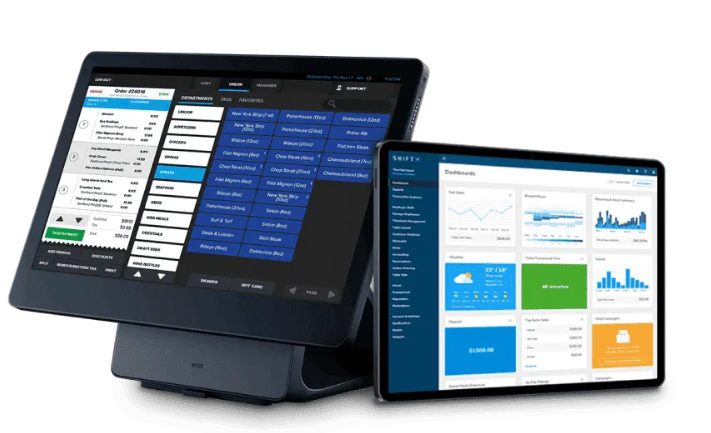
SkyTab is a cloud-based point-of-sale system built for full-service restaurants. It runs on tablets and terminals, handles table management, splits checks, processes payments, and integrates with third-party services like DoorDash and Uber Eats out of the box. The system includes a free online menu and loyalty program, which saves you from hunting down another vendor.
The pitch is simple: one platform for front-of-house, back-of-house, and payments. No separate devices cluttering your kitchen. No separate payment processor eating margin with hidden fees. But pitch and practice diverge fast when your internet hiccups or your manager needs a custom report at close.
Think of it as a generalist. It does table service, delivery integration, and kitchen management in one ecosystem. That means fewer moving parts—if it works. It also means you’re locked into SkyTab’s approach to workflows, reporting, and customer support.
Performance & Core Features: A Hands-On Analysis
Day-to-Day Performance and Reliability
After 6 months, users report consistent uptime with no crashes during normal operation. Handhelds stay responsive. Terminals don’t freeze mid-transaction. Staff gets trained in a day or less—one stadium operator got new hires up to speed in about 1 hour. That’s a real win when you’re running seasonal events or seasonal staffing.
The problem appears when internet dies. No offline mode means a black screen during outages. You can’t process payments. You can’t print tickets. You’re dead in the water. If your venue depends on flaky WiFi or you operate in an area with unreliable connectivity, this is a deal-breaker. Check your ISP uptime before you sign.
Split tickets occasionally confuse the order-processing screen. It’s not a showstopper, but it forces staff to verify what’s going to the kitchen. During a rush, that friction adds up. Menu errors post-installation are another symptom: you’ll spend 3 days fixing backend configuration after launch. That’s on you and SkyTab’s implementation team, not a production bug, but it’s lost time.
SkyTab Reporting and Analytics Review
Daily close reports dump every transaction detail without filtering or customization. You get raw data, but you can’t tailor it to what you actually need. Want to see revenue by daypart? Want to isolate void transactions? You’re stuck scrolling through everything or exporting to Excel and building your own pivot table.
Support doesn’t help much here. Users report that support teams are sharp during setup but lack knowledge on custom reporting. If your manager asks “why didn’t we get a report this morning?” and the answer lives in report customization, you’re on your own.
Real-time reconciliation works. Stadium operators praise the data accuracy for resource allocation and shift planning. If your concern is “do the numbers add up?” the answer is yes. If your concern is “can I shape the data to run my business?” the answer is “not easily.”
Integrated Payment Processing
Direct integration with DoorDash and Uber Eats saves you from manual order entry. Orders land in SkyTab’s queue automatically. No double-entry. No missed orders. That’s genuine operational lift, especially if delivery is 20%+ of your revenue.
Payment processing is bundled, which reduces vendor sprawl. One invoice, one support contact for POS + payments (in theory). In practice, when a payment fails or settles late, you’re triangulating between SkyTab and your payment processor. Responsiveness during setup is solid; ongoing technical depth on edge cases like void-after-close or duplicate authorizations varies.
Deep Dive: SkyTab Mobile POS & Kitchen Display System (KDS)
On the Floor: SkyTab’s Mobile POS in Action
Handhelds are the standout feature. Servers take orders tableside. Orders flow to the kitchen instantly. Peak-hour errors and delays drop noticeably. A 6-month user reports handhelds cut table service time and reduced kitchen backlog during lunch rush. Staff doesn’t need weeks of training—they’re productive in days.
The interface is intuitive enough that new hires don’t become a bottleneck. That matters when you’re 3 people short on a Saturday night. The downside: if a server’s tablet dies mid-service, they’re back to pen and paper until you swap hardware or reboot. Have spares charged and ready.
Payment security is handled through the integrated processor, so you’re not passing card data through multiple systems. That’s compliant and simpler than cobbling together separate terminals.
The Heart of the Operation: SkyTab’s Kitchen Display System (KDS)
This is where SkyTab separates from cheap POS rental rigs. The kitchen display systems for restaurants receive orders directly from front-of-house. Tickets print on the screen in real-time. No paper. No missed orders. No “I didn’t see the ticket” excuses.
Operators love the workflow: specific menus per station, order filtering by item type, and instant visibility into what’s being worked. A stadium vendor using SkyTab per-stand menus reported efficiency and accuracy gains. Cooks see exactly what they need to make without parsing every ticket on the board.
The catch: if internet fails, the KDS goes dark. That’s the same vulnerability as the handhelds. High-reliability venues should plan for that—dedicated internet line, backup cellular hotspot, something. If you lose connectivity during service, your kitchen is flying blind.
Training on the KDS is fast. Staff adapts quickly because the logic is straightforward: orders appear, you make them, you mark them done. The system doesn’t make cooks think differently; it just removes paper and delays.
The Long-Term Verdict: SkyTab POS Pros and Cons After 6 Months
Pros:
- Handhelds genuinely speed up service and reduce order errors during peak.
- Kitchen display system is fast and reduces tickets-on-paper chaos.
- DoorDash and Uber Eats integrate natively—no manual data entry.
- Staff training is quick; new hires get up to speed in a day or less.
- Real-time reconciliation keeps your numbers honest.
- Free online menu and loyalty program included—no extra vendor to manage.
- Implementation team is responsive during setup and launch.
Cons:
- No offline mode—internet outage = black screen and no sales.
- Daily reports are data dumps; no customization or filtering without manual export.
- Support knowledge degrades after launch; ongoing technical issues get slower responses.
- Split tickets can confuse the order-processing screen; staff has to verify.
- Post-install menu fixes take 3+ days and require backend configuration.
- Shipping delays reported in some cases; restocking handhelds or terminals can stall.
The 85% positive rating across SoftwareAdvice and Capterra reflects strong core performance with scattered frustration on the edges. Most users say “it works great” until they hit a limitation or an outage.
Who is SkyTab POS Best For?
SkyTab fits full-service restaurants with stable internet, delivery operations, and staff that you can train once and trust with tablets. It’s ideal if you run high-volume table service and want to cut order-to-kitchen time.
It’s not ideal for venues with unreliable connectivity, offline-heavy operations, or complex reporting needs. If you need custom reports every day or you operate in areas with frequent outages, look elsewhere or budget for workarounds.
Franchises benefit from the standardized workflow and real-time reconciliation. Multi-unit operators like the per-location menu control and the visibility into resource allocation. If you’re running 3+ locations, the data consistency alone is worth the deployment.
Quick-service and counter operations should evaluate SkyTab against simpler systems. SkyTab’s strength is table management; if you don’t have table service, you’re paying for features you don’t use.
Conclusion
Six months in, SkyTab POS is solid. Handhelds work. The kitchen display system cuts orders-to-kitchen time. Integrations are native. Support during setup is sharp. You’ll train staff in a day and start seeing operational wins immediately.
The gaps matter if you hit them: no offline mode during internet outages, reporting without customization, and uneven support knowledge post-launch. None of these are deal-killers for most restaurants, but they’re friction points you should plan for.
If you’re running a full-service restaurant with decent internet and you want to speed up service while keeping data clean, SkyTab delivers. If you’re in a low-connectivity area or you need granular reporting, you’ll need to adapt or choose a different platform.
The verdict after 6 months is clear: it works as advertised for table service, delivery integration, and kitchen operations. Just go in with open eyes on the offline vulnerability and report customization limits. That’s not weakness—it’s reality.