Cyber threats are changing faster than ever. New scams, phishing, and malware show up every day. These are putting people and businesses at risk. For companies, teaching employees about these dangers is not optional, it is a must. However, traditional training videos can take weeks or even months to make. This is especially when compliance and IT teams are involved.


That is where Vidnoz AI makes a big difference. This platform lets companies create cybersecurity training videos quickly. Whether it is awareness campaigns or compliance updates, Vidnoz AI helps you make clear, professional, and engaging videos in just hours, not weeks.
Vidnoz AI: Safe and Smart AI Video Making Solution
Vidnoz AI uses artificial intelligence to make creating training videos, explainers, and educational content simple. What makes it great for cybersecurity training is its ISO/IEC 27001:2022 certification. This means Vidnoz AI meets top global security standards, keeping your data, scripts, and video files safe and protected.
This high level of security is very important when you are working with sensitive topics like data protection or company policies. Businesses can trust Vidnoz AI to create and store their training materials safely. Vidnoz AI makes cybersecurity training faster, easier, and more secure.
Why Use AI for Cybersecurity Training?
Making cybersecurity videos the old way means hiring writers, filming people, and editing. All of these can be slow and expensive. Vidnoz AI makes this process quick and affordable.
AI-created training videos help companies:
- Update content quickly when rules or threats change. You can easily change the script and remake the video fast. So, your training videos always stays up-to-date.
- Train people worldwide by translating videos into different languages. This helps big companies teach the same cybersecurity lessons to teams everywhere.
- Cut production costs by 80% or more. Without needing cameras, studios, or actors, you save a lot of money to spend on other important security needs.
- Keep employees interested with fun, visual learning. Moving avatars and real-sounding voices are more engaging than boring slides or long written rules, so people remember the training better.
Cybersecurity can feel technical and dry, but AI avatars and voices make it easier to understand. Employees get the important info without feeling overwhelmed by confusing words or too much text.
Key Features That Make Cybersecurity Training Easy with Vidnoz AI
Vidnoz AI mixes smart automation with creative tools so you can quickly make clear and engaging training videos for your whole team.
Over 1,830 Realistic AI Voices
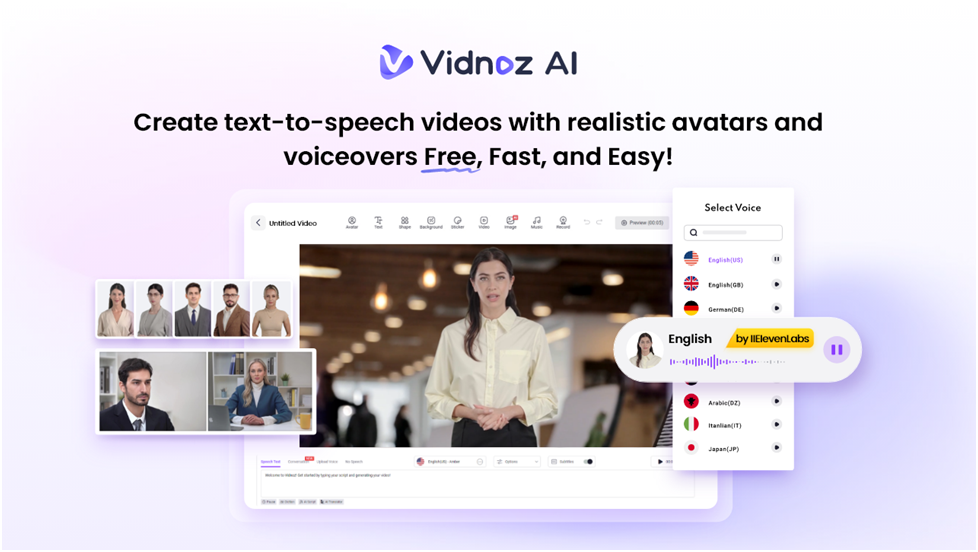
You can choose from more than 1,800 natural-sounding voices in many languages and styles. This helps you to create cybersecurity lessons that feel local and easy to understand for staff around the world. The voices match the avatars’ lip movements perfectly which will be making the videos clear and interesting.
More Than 2,800 Ready-to-Use Templates
Pick from thousands of templates made for training and compliance videos. You can easily add your security tips, company logo, and rules to make videos that fit your brand and message.
2 Free Minutes of Video Every Day
You get 2 free minutes daily to try out video ideas or make short training clips. This is great for small teams who want to start without any upfront cost.
Over 1,700 Realistic Avatars
Choose from many characters like IT experts, customer service reps, and business pros. These are perfect for cybersecurity training.
- Avatar Lite: Best for quick updates or short training videos.
- Custom Avatar Pro: Create a digital version of yourself or your company spokesperson to deliver training in over 40 languages with a consistent voice.
- Motion Avatars: These avatars move naturally with gestures and expressions. Motion avatars will help in making your videos feel lively and keeping viewers focused.
With these features, Vidnoz AI helps you make cybersecurity training that’s easy to create, professional, and effective.
How to Make Cybersecurity Training Videos with Vidnoz AI?
Creating cybersecurity videos with Vidnoz AI is easy and fast. Just follow these simple steps:
Step 1: Sign Up or Log In
Go to the Vidnoz AI website and create an account. You don’t need to download anything as the tool is online. You can work from anywhere and easily team up with your security or HR coworkers.
Step 2: Pick a Template or Avatar
Look through the templates made for training, safety, or awareness. Choose one that fits your topic like phishing, data protection, or password tips. Then pick an avatar that suits your audience. Whether it is a professional trainer or a friendly employee character, vidnoz AI offers it all.
Step 3: Add Your Training Script
Paste your script or type it right into the editor. Use Vidnoz AI’s text-to-speech to pick from thousands of natural voices. The AI matches the avatar’s lip movements, so it looks and sounds real.
Step 4: Customize Your Video
Add your company logo, change backgrounds, or upload images like examples of phishing emails or password tips. Adjust colors to match the style of your company. So, the video feels familiar to your team.
Step 5: Create and Share
Click “Generate” and wait a few minutes for your video to be ready. Then share it on your training platform, in emails, or on the learning site of your company.
Creative Ways to Use Vidnoz AI for Cybersecurity
Vidnoz AI is not just for basic training videos. It is flexible and lets you get creative with your cybersecurity content.
Here are some smart ideas.
- Monthly Security Tips
Make short videos about the latest phishing scams or how to keep passwords safe.
- Incident Simulations
Use avatars to act out real security problems and show employees how to handle them.
- Compliance Updates
Share quick clips about new privacy rules or company security policies.
- Employee Onboarding
Include cybersecurity lessons in new hire training to start everyone off right.
- Quiz Introductions
Create short explainers before employees take security quizzes to help them prepare.
This way, security training becomes a regular, ongoing part of work, not just a once-a-year event.
Final Thoughts
Cybersecurity awareness begins with good communication. So, videos are the best way to reach every employee. With Vidnoz AI, businesses can create training videos in minutes.
This tool helps you to make videos quickly, affordably, and safely with lots of avatars, voices in many languages, and easy-to-use templates. So, anyone can create professional and powerful cybersecurity training videos using Vidnoz AI.