


“How to recover deleted data from PC” is a quite common user query on the internet. That’s the first thing people look for after data loss. However, when you delete data from your computer, the Operating System (OS) automatically moves the deleted data to the Recycle Bin. And you can always effortlessly recover deleted data from PC’s Recycle Bin—that is, if you hadn’t deleted the data by using ’Ctrl + Shift + Delete’ or emptied the Recycle Bin.


Can You Recover Permanently Deleted Data from PC?
When data is permanently deleted using CTRL+SHIFT+DEL combination, the OS removes only its file address from the Master file Table (MFT)—a database that the OS uses to locate and access files. The actual file or data remains intact, unless overwritten which happens as follows. After file deletion, the space allocated to the deleted file is marked as available and new data can be stored in that location. When this happens, it leads to data overwriting, which permanently destroys data from the drive beyond recovery.
And that’s why it’s strongly recommended to stop using the drive or PC immediately after a data loss incident, which is key to successful recovery of the deleted data.
You can use a specialized data recovery software such as Stellar Data Recovery to recover the deleted data. The software can securely recover the deleted data by using advanced data recovery algorithms and a scan engine.
Easiest Methods to Recover Deleted Data from PC
Besides data recovery software, there are a few other methods to recover deleted data from a Windows PC. Read the step-by-step instructional guide in the following sections.
Heads-Up!
Immediately STOP using the computer, hard drive or any other storage media after data loss, as continued usage might overwrite the deleted data and make its recovery impossible.
METHOD #1: Check the Recycle Bin
Recycle Bin is the first place where you should look for your deleted data.
Go to the Recycle Bin. Search the data and if you find it, right-click on it and choose ‘Restore’. You will find the restored data in the original folder location from where it was deleted.
METHOD #2: Restore Files from Backup
If you have Windows Backup, follow these steps to restore deleted files:
1. Go to Control Panel, select System and Maintenance < Backup and Restore and select Restore files from backup
2. If the backup is not listed or is stored in a different drive, click ‘Select another backup to restore files from.’
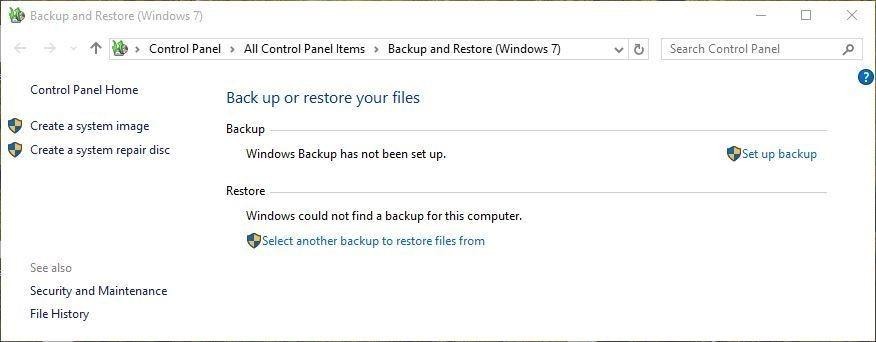
3. Follow the wizard and restore your deleted files from the backup.
Alternatively, you can schedule automatic Windows 10 backup using File History. All you have to do is go to Control Panel, turn on the ‘File History’ option, and then follow the setup wizard.
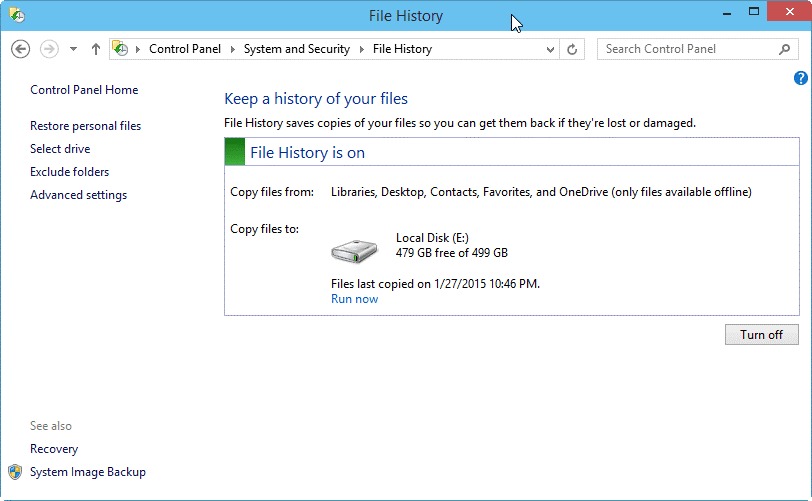
If you have a backup readily available and File History on, you can recover your deleted files anytime using Windows backup and restore utilities.
METHOD #3: Recover Data using Advanced Data Recovery Software
A data recovery software is one of the safest and easiest ways to recover deleted data from PC. Software such as Stellar Data Recovery Standard feature advanced file scan engine that quickly discover lost and deleted files on the storage drive. Further, the software facilitates file search and filtering for quickly locating the desired files.
Besides, with the software, you can always recover the data from formatted, corrupt, deleted, or lost partitions of internal or external media such as SSD, HDD, Flash drives, SD cards etc.
Follow the 5-Steps recovery process to recover your deleted data from a Computer:
- Run Stellar Data Recovery Standard and select the type of data that you want to recover.
- After that, select the location of the deleted data and click ‘Scan.’
- The software scans the location and searches for the deleted data. You can preview the files during the process; just click ‘Turn On Preview’ option
- Once the scanning is over, the software lists the recoverable files. If the desired files aren’t visible in the scan results, use search and filter options. If still not found, run ‘Deep Scan’ by clicking ‘Click Here’ link at the bottom of the software window
- After the scan, select the required files and click ‘Recover.’
Choose a save location on a different drive or volume and click ‘Start Saving’ to save recovered files at the desired location
The Final Words
Now that you are aware of the different data recovery options to consider after data loss, you can quickly recover lost files on Windows. Though the best preemptive measure for data recovery is to take regular data backup, but sometimes it may not be available in a workable state.
In all such data loss situations, a secure and professional data recovery software such as Stellar Data Recovery can provide the best solution to recover deleted data from a PC.









